1. Download your Google Reader data
- Login and download your Google Reader data via Google Takeout (until July 15, 2013)
- Click Create Archive -> Download
- Unpack the downloaded *-takeout.zip archive (it should contain subscriptions.xml file)
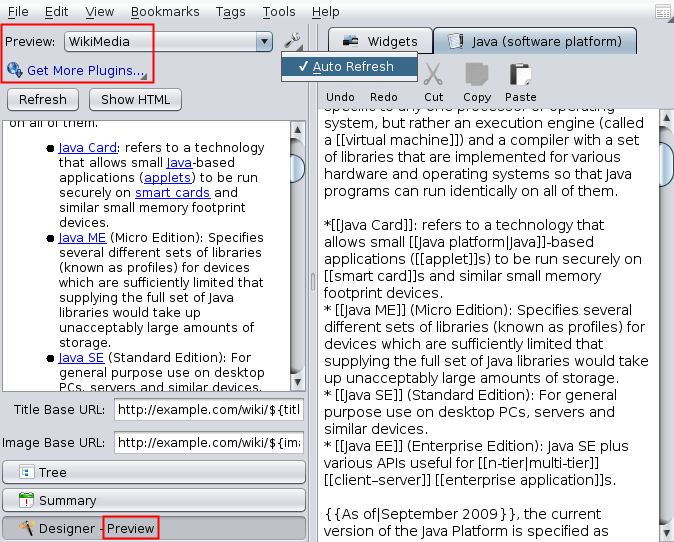
Wiki Tools allows you to preview and test a raw wiki text used in various editable websites, such as Wikipedia.
The plugin uses Java Wikipedia API (Bliki engine) for parsing and converting Wiki syntax to HTML.
This new plugin allows you to preview/validate Markdown and BB Code text on-the-fly. Just create or open existing Notepad item, type some text, and press F4 :)
Note: Requires Makagigia 3.8.1+
Note: This feature will be available in version 3.7.3 Beta. You can test the Alpha version here: http://makagiga.sourceforge.net/playground/latest/
"Air" wallpaper from KDE4 + "Drop Shadow" plugin
Note: This feature will be available in version 3.7.3 Beta. You can test the Alpha version here: http://makagiga.sourceforge.net/playground/latest/
"Pressed" OK button
Upcoming v3.6 includes a new JavaScript Expression evaluator.
=<JavaScript Expression>=2+2
=foo=15; 1337*(42+foo)
foo is a user defined variable (type =foo to display its value).
See all JavaScript Operators.
Password Based Encryption (PBE) allows you to protect particular files with password. This feature will be available in version 3.5 Beta.
1. Open "Properties" dialog for the file you want to encrypt.
2. Click "Set Password..." to change or set a new password. If the file is already encrypted you will be asked for the current/old password.
3. Click "OK" to encrypt file.
Due to security reasons the following features are disabled for encrypted files: Searching by file content, Tasks in the Summary panel and Alarms, Thumbnail preview, Previous files versions, Image preloader.
It is possible to encrypt the following file types: Notepad, To-Do List, Link, and Images.