Showing posts with label wip. Show all posts

2014-03-17

Makagiga 4.99 Alpha 1 (preview)

Download

User Interface

  • NEW: Now you can use Ctrl+Mouse Wheel to zoom in/out in all tabs (like in web browsers)
  • New default colors, bug-fixes, and minor tweaks
  • NEW: Highlight found text keywords in list views:
  • New Splash Screen ;)

Tree

NEW: AES-128 file encryption (password protection). NOTE: To decrypt such file you need Java 8 and Makagiga 5.x. You can still select an older encryption algorithm for compatibility with Java 7/Makagiga 4.x.

Feed Viewer

NEW: Customizable background, text, and link colors:

Notepad

  • NEW: Text auto completion (EXPERIMENTAL)
  • NEW: Added "Line Width" and "Margin" options:

Widgets

  • Background and Title color preview:
Compatibility with Makagiga 4.12

  • All plugins should work with Makagiga 5.x. Click "Update Plugins" to ensure all installed plugins are up to date.
  • Some JavaScript scripts may need update to work correctly with the new Nashorn engine (to be documented).

2013-10-31

Makagiga 4.11 Alpha 1 (preview)

This preview version includes some new features as well bug-fixes and minor UI tweaks. Please remember that this is a test version and may be more unstable or buggy ;)

Download Alpha

Tasks

Repeat Rule editor: Month calendar preview for Daily/Weekly rules

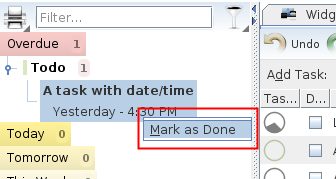
Marking tasks as done directly from the left sidebar (see context menu)

Plugin Installer

Allow multiple plugin or file selection (hold Ctrl key and click to select more items)

2013-08-31

4.9.1 Alpha 1 ready for testing

Feature highlights:

RSS Feed Viewer

(Re-)Added "Load and Show Full Page" option. This is mostly workaround for RSS feeds that displays only part of the full article. Now you can view the Dilbert comic strip again ;)

Tasks

Added "Duration" column for easier and more detailed time scheduling:

User Interface

  • Any date/time input field now allows you to copy date in a preferred format
  • Calendar Widget: Added "Maximize" button. It's a conveninet shortcut for menu bar -> Tools -> Calendar

Download

2013-05-06

What's new in Makagiga 4.9 Alpha 1?

Download

Tasks

Show alarm count in system tray icon (see menu bar|Tools|Settings|Tasks):

Redesigned and cleaned up task properties menu. The new popup menu is more compact and contains less menu items. Frequently used actions are now displayed as buttons instead of submenus.

Notepad Preview panel

Makagiga can now open linked documents in tabs instead of in an external application. You can combine this feature and Markup Preview/Wiki Tools plugin to create a basic wiki-like system.

Tree

Added function to remove existing document password protection (see Properties|Set Password...|Remove Password button).

User Interface

Option to set icon size in Sidebar or Tabs. By default Makagiga uses small icons in both tabs and sidebar buttons. Since version 4.9 you can uncheck "Small Icons" option to use larger icons.

Hold right-mouse-button and move cursor to list all matching mouse gestures. You can still press F1 to see ALL gestures.

2013-02-23

4.7 Alpha 1

This is a summary of changes in Makagiga 4.7 Alpha 1.

Tasks

Grouping tasks by Category, Priority, etc. (click Tasks -> Filter -> Group By):

EXPERIMENTAL: Basic Markdown Syntax support in Summary column (see menu -> View -> Markdown Syntax):

Improved alarm notification window:

Notepad

Background and text color options:

Tabs

Tab History (Ctrl+Shift+T): Group items by date; keep more items in history:

Widgets

Wikipedia options moved to the "Internet Search" widget menu:

Misc.

2012-08-13

Updated Sea Glass Look And Feel (v0.2 Beta)

The new version can be downloaded and installed via menu bar -> Tools -> Plugins -> Get More Plugins.

Note that it's still Beta so you may notice some bugs and other visual issues ;)

Screenshot

2012-04-24

What's new in Makagiga 4.3 Alpha 1?

Todo Lists

  • Added "Task Properties" toolbar button
  • Group tasks by week and month ("This Week", "This Month")
  • New date/time format
  • New task color rendering

EXPERIMENTAL: Repeat rules for recurring tasks

  1. Click Task Properties -> Edit Repeat Rule
  2. Click Task Properties -> Apply Repeat Rule or mark task as "done" to automatically set next date

Day Tags

It's a simple visual reminder displayed in Calendar widget or Calendar tab. Click on a day button to add a new Tag/Category.

EXPERIMENTAL: Security Manager

Security Manager can detect and block suspicious plugin activity such as unauthorized file system access or Internet connections.

You can download the latest Alpha version and full ChangeLog from makagiga.sourceforge.net/playground/latest/

2012-01-12

Makagiga 4.1.1 Alpha 2 and Weather widget

Makagiga 4.1.1 Alpha 2

This alpha release brings bugfixes, minor improvements and API updates. Please test and report all bugs :)

Weather widget

A new small widget that displays a current weather condition. It's based on the Yahoo! Weather service.

  • Right-click on a widget and select "Settings" menu item
  • Click "Set Location", find your city, and click "OK"
  • It requires Makagiga 4.1.1 Alpha 2

Downloads

You can get the above files from http://makagiga.sourceforge.net/playground/latest/

2011-12-12

Analog Clock widget (alpha!)

Download

The new widget requires Makagiga 4.1.1 alpha (included above).

Right-click on a clock to change colors, frame style, etc. It's based on the SteelSeries library.

2011-08-22

Experiment: A two-color widget theme

Blue background and Black titles configured separately...

2011-08-14

Plugin Updates for Makagiga 4.x, part 1

New Plugins

  • Garland Theme 0.9 (blue, green)
  • Presentation Mode 1.0 - the old View|Presentation from Makagiga 3.x
  • Calendar ("cal" Console command)

Updated Plugins

  • Login 2.0
  • RTF Document 1.0.2
  • Digital Clock 1.0.7
  • quickQuit 1.0.2
  • All Internet Search plugins

Work in Progress Plugins

2011-06-26

Makagiga 4.0 Alpha 6

Makagiga 4.x requires JDK/Java 7.0.

See the previous post for installation instruction and known issues.

Summary of changes for Alpha 3, 4, 5 and 6... :)

Tasks

Full screen Calendar tab (menu -> Tools -> Calendar). It's like Calendar widget only larger:

Improved Task Summary:

Widgets

  • Show tool bar and "Close/Minimize" buttons on mouse hover
  • Updated Internet Search widget

Added option to change To-Do widget title:

Misc.:

  • Improved color pickers
  • Console: Added "Print Debug Messages" option to suppress "stderr" text and other log messages (see Tool Bar)
  • Todo List: Press Ctrl+Enter to display date/time dialog window and add a new task
  • Rounded corners in Category labels
  • Paint focus border using a nice dashed lines
  • New cache system for downloads, RSS, and thumbnail previews. (It's faster but still a little bit buggy)
  • + Bug fixes and other improvements

New splash screen image and startup progress bar:

2011-04-18

Makagiga 4.0 progress

  • Removing dead/unused code
  • 2011/04: Removing @Deprecated/@Obsolete classes and methods (50% complete)
  • Code refactoring and clean up -> better API (50% complete)
  • 2011/05: Migration to Java 7 and NetBeans IDE 7
  • Application startup optimizations (50% complete)
  • New features and improvements, etc.
  • Public testing (v4.0 Beta 1, Beta 2...)
  • API stabilization (binary and runtime compatibility)
  • Bug fixes, regression fixes
  • 2011/07: Plugin updates
  • No new major features (feature freeze)
  • 2011/08: Final v4.0 release

2011-04-13

Makagiga 4.0 (Codename: Super-Sonnicus Idioticus) Early Alpha 2

This is the second public alpha build. It contains some new features, improvements (and bugs ;).

Testing

  1. Download the portable .zip version
  2. Run ./run-portable.sh or run-portable - this will launch Makagiga in a new profile. You can still use the existing default profile (./run.sh) but it's not recommended yet.
  3. Any existing RSS Archive will be converted to the new optimized/smaller format. The old RSS Archive will be saved in "RSS Archive Backup (for Makagiga 3.x).zip" file, so you can downgrade back to Makagiga 3.x in case something goes wrong.

Known Issues

  • All plugins designed for Makagiga 3.x are temporarily incompatible
  • Background color in Notepad and Note widget may be displayed incorrectly

Some new features

Removed main menu -> View -> Tool Bars -> Status Bar option. The status bar is now hidden by default.

Categorized files and tasks in Tags menu:

Improved tabs header UI. Plugin Settings in a tab...

Source Code Changes

  • Huge API clean up and refactoring - see PORTING.txt if you can't find the old stuff
  • Removed tons of @Deprecated/unused code

2010-11-01

What's new in Makagiga 3.8.8 Alpha?

You can download the latest alpha snapshot and more detailed ChangeLog at: http://makagiga.sourceforge.net/playground/latest/

Built-in Wikipedia browser (experimental ;-)

The browser is currently integrated with Internet Search Widget and Calendar Widget (see Information for This Day and News menu items).

Resizable modal dialogs

Color Palettes in color chooser dialog window

A basic support for plain text todo lists with checkboxes

More info: Use a Unicode Text Trick to Make Lists with Checkboxes @ howtogeek.com

2010-08-25

What's new in Makagiga 3.8.7? (alpha, unstable)

You can download the latest alpha snapshot here: http://makagiga.sourceforge.net/playground/latest/

Main window

  • Tab on top like in Firefox 4 ;)
  • Main tool bar is now hidden by default
  • Tab colors (a small line above tab title)

Widgets

  • Widgets on tab bar
  • Removed "Show Widgets" button (you can still press the F5 key to show/hide widgets)
  • Internet Search panel is now available as widget
  • Improved support for drop shadow plugin

Look and feel preview

Updated Substance plugin