2010-11-21

2010-11-07
New Plugin: Kids Icon Theme

How-to install?
- Click menu -> Tools -> Add or Remove Plugins
- Uninstall Tango Icon Theme (if any)
- Click Get More Plugins... and install Kids Icon Theme.
- Restart Makagiga
You can find more cool icons by Everaldo Coelho here: www.everaldo.com
2010-11-01
What's new in Makagiga 3.8.8 Alpha?
You can download the latest alpha snapshot and more detailed ChangeLog at: http://makagiga.sourceforge.net/playground/latest/
Built-in Wikipedia browser (experimental ;-)

The browser is currently integrated with Internet Search Widget and Calendar Widget (see Information for This Day and News menu items).
Resizable modal dialogs

Color Palettes in color chooser dialog window

A basic support for plain text todo lists with checkboxes

More info: Use a Unicode Text Trick to Make Lists with Checkboxes @ howtogeek.com


2010-10-11
New plugin: Wiki Tools 0.9 Beta
Wiki Tools allows you to preview and test a raw wiki text used in various editable websites, such as Wikipedia.
How it works?
- Click menu -> Tools -> Add or Remove Plugins -> Get More Plugins... and install Wiki Tools plugin. Restart Makagiga.
- Create a new "Notepad" item
- Type some wiki text
- Press F4 and select Wiki from the Preview list
- Type more text and the preview will update automagically! :)
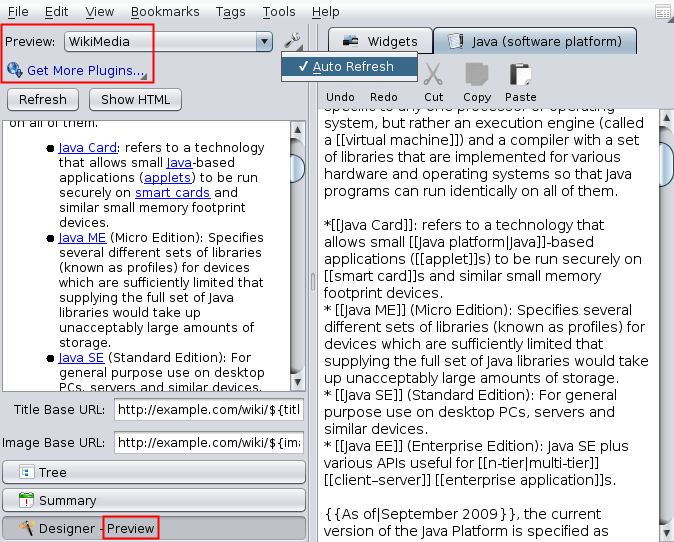
The plugin uses Java Wikipedia API (Bliki engine) for parsing and converting Wiki syntax to HTML.
Subscribe to:
Posts (Atom)