2013-01-17

Makagiga 4.5 Beta released! (+visual guide)

Download and Links

Tasks

New plain text format based on Org mode:

* TODO Lorem Ipsum [30%]
* TODO [#C] A low priority task
* DONE A task with categories :Starred:Work:
* TODO A task with date/time
  <2013-01-17 Thu 20:27>

To convert Makagiga tasks to plain text simply press Ctrl+C or click menu -> File -> Export. You can also import *.org files and open it using Notepad plugin.

Search and filter tasks by priority type (High, Normal, etc.) and progress (0%, 50%, etc.):

Tasks Summary

Bold font in summary text, minor UI tweaks:

Feed Reader

  • Quick RSS Feed configuration via "Settings" button
  • Bold font for unread RSS articles

Convenient "Block Images" and "Exclude from..." options in "Add RSS Feed" window:

Misc.

Show quick action buttons in "Plugins" tab and in font chooser dialog:

New and updated icons in many UI elements:

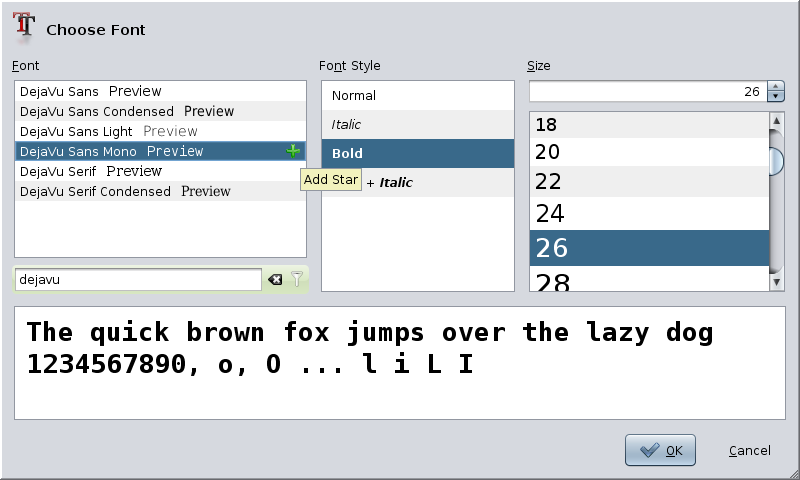
Improved text preview in font chooser dialog:
DuckDuckGo is now the default Internet search provider:

CDE/Motif Look and Feel is back (no screenshot because it's ugly ;-)

Image Viewer

New navigation between images. Hint: Press Space/Backspace to open next/previous image:

Notepad

Larger text cursor width in text editors. Improved HTML rendering in Preview panel...

"Login" Plugin

New Login plugin allows you to set Master Password which can be used to encrypt/decrypt your Makagiga documents with single-click.

2012-08-20

QR Code generator plugin (experimental ;)

Mobile Barcode plugin allows you to display any text or link as QR Code image which can be quickly captured and decoded using your barcode scanner.

Example: Show barcode for a Link Address

Example: Show barcode for a selected text

2012-08-14

JGoodies Looks Look and Feel

Another great LAF plugin for Makagiga 4.3.1 Beta :)

JGoodies Looks can be downloaded and installed via menu bar -> Tools -> Plugins -> Get More Plugins. To change default color theme, go to menu bar -> Tools -> Settings -> Look And Feel, and click Settings button...

Screenshots

2012-08-13

Updated Sea Glass Look And Feel (v0.2 Beta)

The new version can be downloaded and installed via menu bar -> Tools -> Plugins -> Get More Plugins.

Note that it's still Beta so you may notice some bugs and other visual issues ;)

Screenshot

2012-08-08

Updated Digital Clock widget

Now with Time Zone support:

Unfortunately Analog Clock widget will be updated later...

2012-08-07

Makagiga 4.3.1 Beta released :)

RSS Feed Viewer

  • Show custom icons
  • Added "Status" column
  • Show full link address instead of "Complete Story" text

Customizable article list font:

Tree

Searching by date (Ctrl+F7)

Tasks

New "Add Task" menu item with new input dialog (see Edit menu)

First day of week configuration (Tools -> Settings -> Tasks)

Link Plugin

Added "Open selected link" action to the Tree context menu:

Scripting (custom toolbar actions)

Added "Show Button Text" option: