2013-10-31

Makagiga 4.11 Alpha 1 (preview)

This preview version includes some new features as well bug-fixes and minor UI tweaks. Please remember that this is a test version and may be more unstable or buggy ;)

Download Alpha

Tasks

Repeat Rule editor: Month calendar preview for Daily/Weekly rules

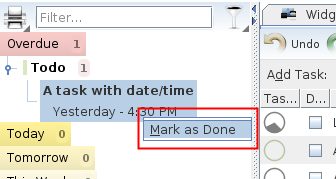
Marking tasks as done directly from the left sidebar (see context menu)
Plugin Installer

Allow multiple plugin or file selection (hold Ctrl key and click to select more items)

2013-08-31

4.9.1 Alpha 1 ready for testing

Feature highlights:

RSS Feed Viewer

(Re-)Added "Load and Show Full Page" option. This is mostly workaround for RSS feeds that displays only part of the full article. Now you can view the Dilbert comic strip again ;)

Tasks

Added "Duration" column for easier and more detailed time scheduling:

User Interface

  • Any date/time input field now allows you to copy date in a preferred format
  • Calendar Widget: Added "Maximize" button. It's a conveninet shortcut for menu bar -> Tools -> Calendar

Download

2013-07-06

How to import your old Google Reader RSS subscriptions

1. Download your Google Reader data

  1. Login and download your Google Reader data via Google Takeout (until July 15, 2013)
  2. Click Create Archive -> Download
  3. Unpack the downloaded *-takeout.zip archive (it should contain subscriptions.xml file)

2. Import the data (XML, OPML) into Makagiga

  • Launch Makagiga
  • Right-click and select menu Import -> Import Feed List
  • Find and select the Reader/subscriptions.xml file then click Import to finish

2013-06-26

New Plugin: Font Awesome Icon Theme

It's a Font Awesome-based, customizable icon theme for Makagiga 4.8+, inspired by this blog text.

Colorization Enabled (default)

Colorization Disabled (see Makagiga settings)

Custom Icon Color

Custom Icon Color (dark Look and Feel theme)

To install this icon theme, click Tools -> Plugins -> Get More Plugins. You may also need to disable other installed Makagiga Icon Themes (e.g. Tango).